
January · Applications open
A parent applies between errands
Documents go up from the phone, and a tracking code replaces the call to the office.

Dock moves your whole admissions-to-payment process online — applications, requirements, enrollment, invoicing, and bank reconciliation — so no student sits enrolled without a paid, posted invoice behind them, and no tuition slips through unreconciled.
The walkthrough is the whole product, screen by screen. No form, no sales call.
One record per student carries the whole way through — applied, tested, seated against a live cap, invoiced, paid, matched against the bank statement, and posted. Nothing is re-keyed between stages.
Prefer to explore on your own? Take the screen-by-screen product walkthrough →

Every re-typed form is staff time you’re paying for, and every unreconciled receipt is tuition you can’t see. Your registrars know this dance by heart — Dock takes it off their desks so the numbers close on their own.
This is where Dock goes past a generic admissions tool. Fee structures are configured per grade and school year, invoices generate automatically, and parents pay by GCash, bank transfer, QR Ph, or cash and upload their receipt — Dock’s OCR reads the amount and reference and matches it to the right invoice.

Illustrative Dock environment using representative Philippine school workflows.
A parent applies 24/7 from any device, uploads documents, and gets a tracking code they can use to check status anytime — so your office stops fielding status calls.

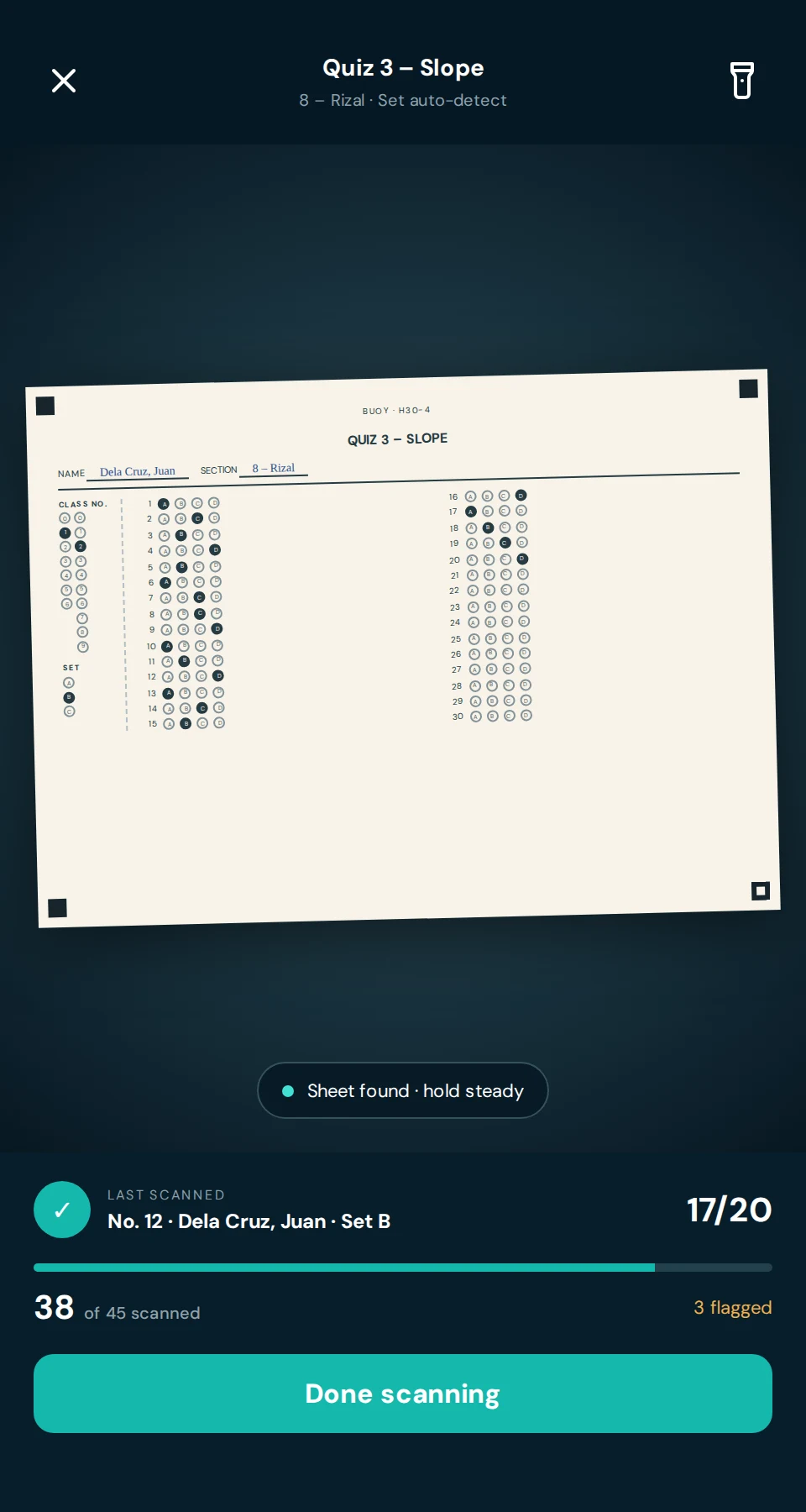
Applicants shade printed answer sheets. Your staff hold a phone over each paper, and every score is recorded against the applicant and ranked, ready for the admissions decision. No checking by hand, no typing scores into a spreadsheet.

The full capability set across the five stages of the year. Every line below is in the product today.
Documents go up from the phone, and a tracking code replaces the call to the office.

Seat caps are enforced as students reserve, and the waitlist moves up on its own.

Import the bank statement. Dock matches what it can and lists the rest for review.
International SIS platforms weren’t designed with GCash, Form 137, RA 10173, or DepEd School Forms in mind. Dock was.
Student names, LRNs, birthdates, family contacts, tuition payment records, bank transaction data. Dock holds the most sensitive data your school produces — and it’s built accordingly.
A lot of schools ask this. Here’s the honest answer.
Dock is a flat annual fee, banded by how many students you enroll. Year one costs more than the years after it because it includes setup, configuration, and staff training; from year two you pay the renewal rate for your band. You are banded on your enrollment at the start of the school year and stay there until renewal, so growing mid-year never changes your invoice.
The 50% launch discount applies to the year-one fee only. The renewal rate is separate and lower because it carries no setup, configuration, or training.
| School size | Year onesetup, configuration & training included | Annual renewalyear 2 onward |
|---|---|---|
| Up to 50 students | Standard: | ₱6,990/yr |
| 51 – 100 students | Standard: | ₱12,990/yr |
| 101 – 200 students | Standard: | ₱21,990/yr |
| 201 – 300 students | Standard: | ₱29,990/yr |
| 301 – 400 students | Standard: | ₱36,990/yr |
| 401 – 500 students | Standard: | ₱44,990/yr |
| Above 500 students | Priced to your school — get a quote → | |

We started with research, not a product. Building SchoolBreach.org meant reading the same incident 93 times over: a Philippine school loses control of its student records, usually from aging shared hosting that was never meant to hold LRNs, birthdates, and family contact details in the first place.
The pattern underneath turned out to be operational as much as technical. Private K–12 schools of roughly 100 to 400 students run enrollment on forms, spreadsheets, and re-typing, and run collections on a bank statement someone reconciles by hand at month end. The platforms built to fix that are priced and scoped for schools ten times the size — and none of them were designed knowing what an LRN, a Form 137, or a GCash reference number is.
So Dock is narrow on purpose: the admissions-to-payment loop, for the school size that actually exists here, built by a Philippine team. We would rather be specific about where we are than borrow credibility we have not earned — the product is built and we are onboarding our first founding schools now, which is why the section below tells you exactly what that involves. The breach research and our security architecture →

Founding schools are onboarded by the people who build Dock, not handed a login and a help centre. In exchange, we ask for the feedback that shapes what gets built next.
None of this needs Dock — it is the same information your enrollment season already runs on. The long form of this list, with the detail behind each line, is the implementation checklist.
Talk to us about a founding place →Dock works standalone — admissions, enrollment, and finance without any other OceanEd module. It is also designed to connect: data flows between modules automatically, so an inquiry captured on your school website can pre-fill the Dock application. Many schools start with Dock and expand later.
No — and this is intentional. Parents fill out the application without creating an account, and verify sensitive actions like document uploads with a one-time code sent to their phone or email. After submission they get a tracking code for checking status any time, without logging in.
Parents pay directly to the school's own GCash, bank, or QR PH account — no separate gateway account needed — then upload a receipt in Dock. The system's OCR reads the amount and reference number and matches it to the right invoice; unmatched receipts are queued for staff review. Cash payments recorded at the cashier flow into the same ledger, so reconciliation covers everything in one place.
Yes. Form 137 (SF10) for student transfer credentials generates directly from Dock's student and grade records, along with SF1, SF3, SF4, SF5, and SF7. The data your registrar enters flows straight into the forms DepEd requires — no double-entry, no re-formatting. Form 138 (SF9) report cards can be requested through Dock's document-request queue for staff to fulfill.
You import your bank statement as a CSV or Excel file. The reconciliation engine matches transactions it can identify with confidence — using student names, amounts, and reference numbers — against outstanding invoices. Anything it can't match confidently is queued as an exception for staff review, so you're never left with a mystery transaction and no context. Match rates depend on how consistently your bank and your parents populate reference fields.
No software can make an organization compliant on its own, and we don't claim Dock does. Dock is built to support your school's RA 10173 obligations with RA 10173-aligned controls: versioned and timestamped consent capture at enrollment, complete audit logs on every data action, field-level encryption for sensitive records, and tenant isolation so each school's data is logically separate. Your school remains the personal information controller and is responsible for its own DPA obligations; Dock is the processor. Consult your school's designated Data Protection Officer on your specific requirements.
Onboarding typically takes 1–2 weeks: we set up your school configuration (grades, sections, capacity, fee structures), configure your GCash and bank accounts for receipt reconciliation, and train your admissions staff, registrar, and finance officer. You can start accepting online applications and reservations within the first week.
Dock is the admissions, enrollment, and finance module of the OceanEd suite — application through to enrolled student with a paid invoice. OceanEd as a full platform also includes Shore (public school website), Lighthouse (academics and parent engagement), and other modules. Each stands alone; they are designed to connect.
One system from application to enrolled student with a paid invoice and a clean ledger — built for Philippine K–12 schools, built to support your RA 10173 obligations, and running on enterprise infrastructure.
Not ready to talk to anyone? Start with the implementation checklist — everything your school needs to prepare before go-live. Or see Shore, our website product.